module / hard copy compare

Did it print right?

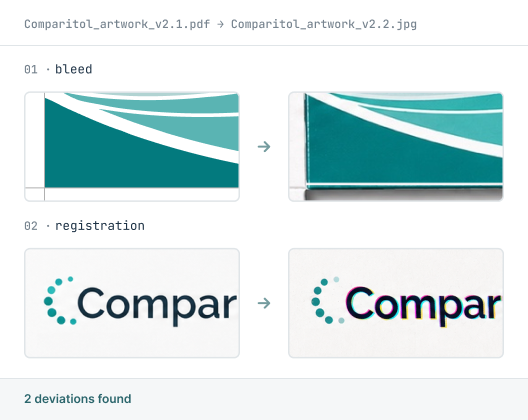
Hard Copy Compare checks a physical printed sample against the approved digital master, catching what changed between screen and shelf. No proprietary scanner, no guesswork.
SUPPORTED FORMATS:
BMP
PDF
Microsoft Word
XML
Microsoft Excel
Email
Plain Text
RTF
HTML
Adobe Illustrator
RTL Scripts
URL
PNG
JPG
How hard copy Compare Works

The comparison process step by step

Four steps from upload to signed report.

01
Upload
02
Compare
03
Review
04
Approve

Scan the printed sample

Capture the physical hard copy through the scanner client, and scan the reverse side too if it carries Braille.

The scanner client works with standard office scanners. No proprietary hardware required.

Load master & scanned target

Use your approved digital file as the source and the scanned image as the target, then set the scan resolution.

Higher scan resolution catches finer deviations.

Compare against real-world conditions

The engine accounts for paper stretch, off-white stock and show-through, surfacing genuine deviations rather than scanning artifacts.

Paper stretch, off-white stock, and show-through are filtered out, so only genuine deviations are flagged.

Sign & store the report

Review the deviations, sign electronically and file the report — the scanned job is cleared from the server once stored.

Every signature and stored report meets 21 CFR Part 11. The scanned job clears from the server once filed.
THERE'S A BETTER WAY

See how it should work? Meet Content Compare.

Capabilities

What Hard Copy Compare detects

Print against the master
The physical sample compared against the approved digital file, so what came off the press matches what was signed off.
Only what changed
The report shows real deviations, not scanning noise, so reviewers trust what's flagged without chasing false alarms.
Built for real print
Accounts for paper stretch, off-white stock, and show-through, surfacing genuine errors rather than artifacts of the scan.
Any office scanner
Works with standard TWAIN scanners — no proprietary driver needed. Large-format scanners are supported too, for full-size leaflets and cartons.
Front and back
Checks both sides in one job, including Braille on the reverse.
Complete audit trail
Every comparison logged from scan to signed report, traceable for compliance.
Customer stories

Listen to our customers

Real teams, real deadlines, real compliance stakes. Here's how Content Compare fits into their process.

"A reliable and professional partner we can rely on"

"We have been collaborating with InformaIT for over ten years. The cooperation has consistently been smooth and effective, from software development through to post-go-live support. Having a dedicated point of contact has undoubtedly contributed to efficient, clear, and prompt communication. InformaIT is a reliable and professional partner we can confidently rely on."
Global pharmaceutical manufacturer, 10+ year customer

"Content Compare has made a real difference"

"Content Compare has made our audit preparation considerably more straightforward. The evidence is already there with each release, so we're not searching for it after the fact. The review queue gives us a clear, reliable picture of what has actually changed, and that consistency has made a real difference to how our team works."
European Regulatory Affairs Lead
EXPLORE THE MODULES

Other Content Compare modules

Content Compare is one platform with four modules. Explore the others to see how text, graphics, print, and codes are all checked in the same workflow.


compliance and security

Built for regulated industries, from the ground up

FAQ

Hard Copy Compare questions

Common questions about how Hard Copy Compare checks your printed proofs.

What does Hard Copy Compare do?
Hard Copy Compare checks a physical printed sample against the approved digital master. You scan the printed item, and the software compares it to the source file to catch any difference between what was approved and what came off the press.
Do I need a special scanner to use Hard Copy Compare?
No. Hard Copy Compare works with standard office scanners, so there's no proprietary hardware to buy or maintain. This makes it simpler and less costly to introduce than tools that require dedicated scanning equipment.
How does Hard Copy Compare handle real-world print conditions?
Hard Copy Compare accounts for the realities of physical print, such as paper stretch, off-white stock, and show-through. It filters these out so the report surfaces genuine deviations rather than artifacts of the scanning process.
Can Hard Copy Compare check both sides of a printed item?
Yes. Hard Copy Compare can check the front and back of a printed sample in one job, including Braille on the reverse, so a complete physical proof is verified against the master.
What does Hard Copy Compare check against?
Hard Copy Compare compares the scanned physical sample against your approved digital master file. This confirms that the printed result matches what was signed off, which manual visual checks of a printed proof can easily miss.

Download leaflet

Fill in the form to download a PDF for the leaflet.

Download your leaflet

Fill in the form to download a PDF for the leaflet.

You're all set! Your leaflet is ready to download.
Download leaflet

Something went wrong

Fill in the form to download a PDF for the leaflet.

Oops! Something went wrong while submitting the form.