




from artwork to compliant approval

The complete proofreading solution for regulated artwork

Content Compare catches every text, graphic, barcode and Braille deviation, before it reaches print. Web-based, validated, and most importantly – built for regulated industries.
See how it works
trusted by
How it works

From upload to signed report

Upload your source and target files. Content Compare does the rest.

Load files

Drop your source and target files into Content Compare. Supports PDF, AI, XML, and dozens more.

Select areas

Tell the system exactly what to inspect, whether that's a whole file, a framed area, or a single barcode or Braille string.

Review results

Every difference or reading is surfaced in a clear, numbered list, each one linked back to exactly where it occurs.

Sign & store

Approve the result with an electronic signature and archive it with a complete, tamper-proof audit trail.
There's a better way

See how it should work? Meet Content Compare.

Why content compare

Built to fit how regulated teams actually work

Every module in a single workflow
Text, artwork, Braille, barcode, and print verification run in one validated pass — one review trail, one report into QA. Nothing assembled by hand from separate module outputs.
Validation in the box
The validation package (test plan, risk assessment, and executed test cases) is included and aligned to GAMP 5 and 21 CFR Part 11. No internal IQ/OQ exercise to commission. No separate validation project.
Browser-native
No software to install, no desktop client, no infrastructure to provision. Built browser-native from day one — not retrofitted onto an existing desktop architecture.
Your own dedicated environment
A dedicated, single-tenant environment for every customer. Your artwork and content never share infrastructure with other organizations.
21 CFR Part 11 & EU Annex 11 compliance
Audit trail, electronic signatures, and access controls aligned to FDA and EU GMP requirements — no configuration required.
Flexible licensing
Concurrent or named-user, choose the model that fits your team. All modules included in one package — no per-module fees, no add-on procurement costs.
Text compare
Graphic compare
Hard copy compare
Braille & barcode
Text compare

Does it read right?

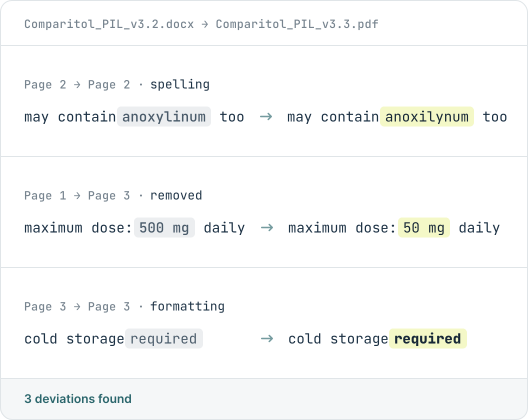
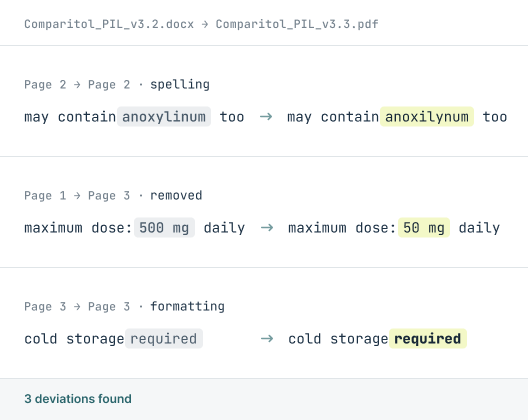
Side-by-side source / target comparison. Every deviation flagged across 120+ locales, every script, every format.

Text Compare guarantees a 100% deviation detection rate for every text change. It identifies exactly what changed, what was added, and what was removed.

Explore Text Compare
Graphic compare

Does it look right?

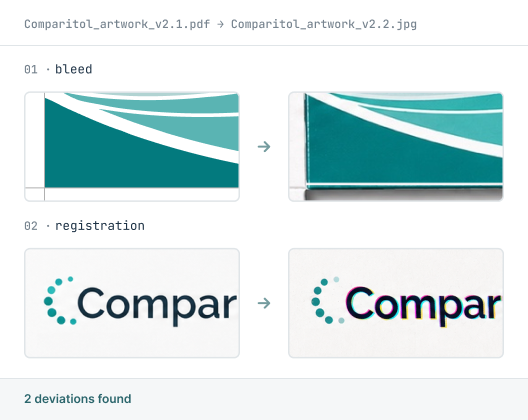
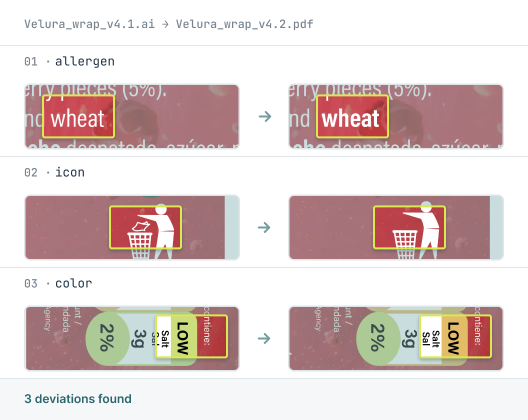
Pixel-by-pixel analysis of your artwork files. Detects color shifts, layout drifts, image replacements, and any visual change invisible to the naked eye.

Works across PDF, Illustrator, and dozens of other file formats — so no version slips through unchecked.

Explore Graphic Compare
Hard copy compare

Did it print right?

Bridges the gap between digital approval and physical print. A scanned sample is automatically aligned and compared against the approved digital file.

Works with any standard scanner, requires no proprietary hardware, and produces a fully signed, auditable report.

Explore Hard Copy Compare
Braille & barcode

Does it scan right?

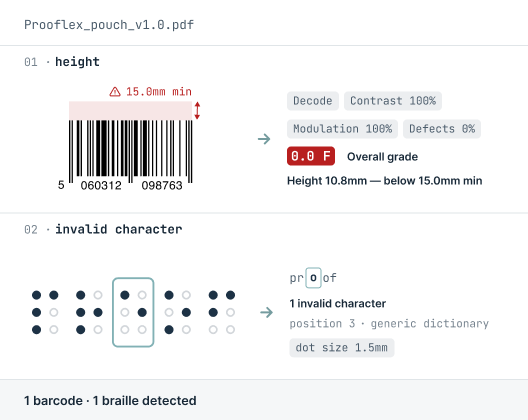
Every barcode is decoded, measured, and graded to full ISO/IEC standard. Braille elements are read and verified against the approved copy.

Both run within the same comparison session and are captured in the final signed report — no separate tools, no extra steps.

Explore Braille & Barcode
Customer stories

Listen to our customers

Real teams, real deadlines, real compliance stakes. Here's how Content Compare fits into their process.

"A reliable and professional partner we can rely on"

"We have been collaborating with InformaIT for over ten years. The cooperation has consistently been smooth and effective, from software development through to post-go-live support. Having a dedicated point of contact has undoubtedly contributed to efficient, clear, and prompt communication. InformaIT is a reliable and professional partner we can confidently rely on."
Global pharmaceutical manufacturer, 10+ year customer

"Content Compare has made a real difference"

"Content Compare has made our audit preparation considerably more straightforward. The evidence is already there with each release, so we're not searching for it after the fact. The review queue gives us a clear, reliable picture of what has actually changed, and that consistency has made a real difference to how our team works."
European Regulatory Affairs Lead
BUILT FOR YOUR INDUSTRY

Wherever a detail can't slip, we check it

compliance and security

Built for regulated industries, from the ground up

FAQ

How Content Compare works

Common questions about the platform and its four modules.

What are the four modules of Content Compare?
Content Compare has four modules: Text Compare (checks every character against the source), Graphic Compare (catches visual and color shifts at the pixel), Hard Copy Compare (checks a printed sample against the digital master), and Braille & Barcode (reads and grades codes and verifies Braille). They run in one platform and share the same four-step workflow.
Can I use just one module, or do I need all four?
You can use the modules that fit your work. Some teams need only text comparison; others use all four. Because every module follows the same upload, compare, review, and approve workflow, learning one means you already know how to use the rest.
How does Content Compare fit into an existing approval workflow?
Content Compare sits at the verification step of your artwork approval process, comparing each version against the approved master before sign-off. Results are logged with electronic signatures and a full audit trail, so the record is ready for review without rebuilding it later.
What file formats does Content Compare support?
Content Compare works with common artwork and document formats including PDF, Word, Illustrator, and image files, and can compare across different formats, such as a Word file against a PDF. Exact format support depends on the module.
How is Content Compare different from manual proofreading?
Content Compare checks every element against the approved master automatically, where manual proofreading relies on the eye catching each difference. It flags only what changed, reducing both missed errors and the time spent reviewing, while producing an audit trail that manual checks can't.

Download leaflet

Fill in the form to download a PDF for the leaflet.

Download your leaflet

Fill in the form to download a PDF for the leaflet.

You're all set! Your leaflet is ready to download.
Download leaflet

Something went wrong

Fill in the form to download a PDF for the leaflet.

Oops! Something went wrong while submitting the form.