module / Graphic Compare

Does it look right?

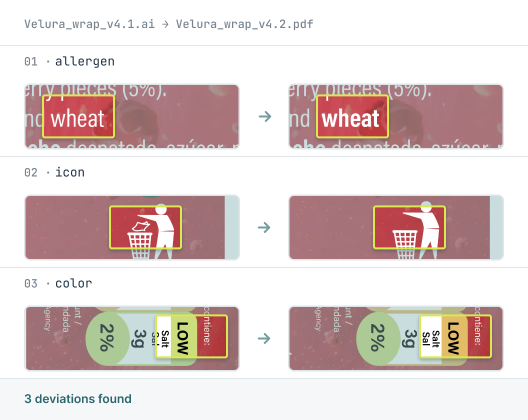
Graphic Compare checks every logo, color, and layout against the approved master, catching the visual shifts the eye slides past. Pixel by pixel, before it prints.
SUPPORTED FORMATS:
BMP
PDF
Microsoft Word
XML
Microsoft Excel
Email
Plain Text
RTF
HTML
Adobe Illustrator
RTL Scripts
URL
PNG
JPG
How Graphic Compare Works

The comparison process step by step

Four steps from upload to signed report.

01
Upload
02
Compare
03
Review
04
Approve

Load source & target

Bring in artwork, PDFs or images. Preview each file and toggle layers and color separations before you begin.

Supports PDF, Illustrator (.ai), and common image formats. Compare several source files against one target in a single run.

Select & align

Compare the whole file or frame a specific area, by template or manually. Auto-alignment locks both files onto a shared reference point.

Auto-alignment locks both files onto a shared reference point and corrects small offsets; differing orientations are detected and rotated to match.

Inspect pixel-level deviations

A pixel-by-pixel engine catches the smallest difference in color or graphic, each one displayed visually and numbered in the deviation list.

Deviations are shown visually and numbered, only the differences, so there's no noise to clear before you trust what's flagged.

Sign & store the report

Annotate, sign electronically and archive the report with overview images and a full audit trail.

Every signature and stored report meets 21 CFR Part 11, so the record stands up to inspection.
THERE'S A BETTER WAY

See how it should work? Meet Content Compare.

Capabilities

What Graphic Compare detects

Every pixel compared
Color, position, and shape differences caught down to the pixel, including shifts too subtle to see by eye.
Only what changed
The report highlights deviations, not everything it scanned, so reviewers trust what's flagged without wading through noise.
Color accuracy
Detects color shifts across the artwork, so a brand color that drifted between versions doesn't reach print.
Layout and placement
Catches moved, resized, or missing elements: logos, icons, mandatory symbols, and text blocks.
Across any format
Compare an Illustrator file against a PDF, or a new proof against the approved master. Different formats, same accurate result.
Complete audit trail
Every comparison logged from upload to signed report, traceable for compliance.
Customer stories

Listen to our customers

Real teams, real deadlines, real compliance stakes. Here's how Content Compare fits into their process.

"A reliable and professional partner we can rely on"

"We have been collaborating with InformaIT for over ten years. The cooperation has consistently been smooth and effective, from software development through to post-go-live support. Having a dedicated point of contact has undoubtedly contributed to efficient, clear, and prompt communication. InformaIT is a reliable and professional partner we can confidently rely on."
Global pharmaceutical manufacturer, 10+ year customer

"Content Compare has made a real difference"

"Content Compare has made our audit preparation considerably more straightforward. The evidence is already there with each release, so we're not searching for it after the fact. The review queue gives us a clear, reliable picture of what has actually changed, and that consistency has made a real difference to how our team works."
European Regulatory Affairs Lead
EXPLORE THE MODULES

Other Content Compare modules

Content Compare is one platform with four modules. Explore the others to see how text, graphics, print, and codes are all checked in the same workflow.


compliance and security

Built for regulated industries, from the ground up

FAQ

Graphic Compare questions

Common questions about how Graphic Compare checks your artwork.

What does Graphic Compare do?
Graphic Compare checks artwork against the approved master and detects visual differences down to the pixel, including changes in color, layout, and placement. It catches shifts that are hard to see by eye, such as a logo that moved slightly or a brand color that drifted between versions.
What kinds of visual errors does Graphic Compare catch?
Graphic Compare catches color shifts, moved or resized elements, missing or added graphics, and layout changes. It compares every pixel against the approved file, so subtle deviations in logos, icons, mandatory symbols, and text blocks are flagged.
Can Graphic Compare compare across different file formats?
Yes. Graphic Compare can compare an Illustrator file against a PDF, or a new proof against the approved master, even when the formats differ. The comparison is based on the rendered artwork rather than the file type.
Does Graphic Compare check color accuracy?
Yes. Graphic Compare detects color differences across the artwork, so a color that has shifted between versions is flagged before it reaches print. This helps protect brand consistency and packaging accuracy.
How does Graphic Compare handle false positives?
Graphic Compare highlights genuine deviations rather than every difference it scans, presenting them visually and numbered. Reviewers see only what actually changed, so there's no noise to clear before trusting the result.

Download leaflet

Fill in the form to download a PDF for the leaflet.

Download your leaflet

Fill in the form to download a PDF for the leaflet.

You're all set! Your leaflet is ready to download.
Download leaflet

Something went wrong

Fill in the form to download a PDF for the leaflet.

Oops! Something went wrong while submitting the form.